<?xml version="1.0" encoding="utf-8" ?>
<feed version="0.3"
	xml:lang="ja"
	xmlns="http://purl.org/atom/ns#"
	xmlns:dc="http://purl.org/dc/elements/1.1/">
	<title>初心者にも分かるiPod,iPod nanoの使い方マニュアル</title>
	<link rel="alternate" type="text/html" href="http://www.ipod-podcast.jp/ipod/" />
	<modified>2009-01-19T15:20:50+00:00</modified>
	<tagline><![CDATA[初心者にも分かりやすく画像を使って解説したiPod,iPod nanoの使い方マニュアル]]></tagline>
	<generator url="http://serenebach.net/">Serene Bach</generator>
	<entry>
		<title>iPod shuffleの使い方</title>
		<link rel="alternate" type="text/html" href="http://www.ipod-podcast.jp/ipod/./eid34.html" />
		<id>http://www.ipod-podcast.jp/ipod/./eid34.html</id>
		<issued>2007-07-15T23:53:05+09:00</issued>
		<modified></modified>
		<summary>iPod shuffleは他のiPodシリーズと違い、ディスプレイがなく曲が入る容量が少ないの設定項目が若干異なります。※iPod shuffleを最初に接続した際にユーザー登録画面が出ますが説明は割愛します。iTunesを立ち上げ...</summary>
		<author>
			<name>admin</name>
		</author>
		<dc:subject>iPodの使い方</dc:subject>
		<content mode="escaped" type="text/html" xml:lang="ja"><![CDATA[<strong>iPod shuffle</strong>は他のiPodシリーズと違い、ディスプレイがなく曲が入る容量が少ないの設定項目が若干異なります。<br />
<br />
※<em>iPod shuffle</em>を最初に接続した際にユーザー登録画面が出ますが説明は割愛します。<br />
<br />
<strong>iTunes</strong>を立ち上げiPod shuffleをPCのUSBに差し込みます。<br />
<br />
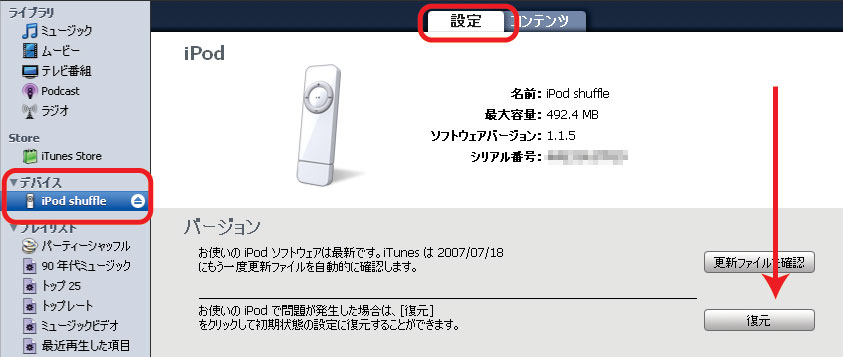
<em>iTunes</em>がiPod shuffleを認識するとiTunesの左側にデバイス＝iPod shuffleが表示されます。<br />
shuffleのアイコンをクリックし【設定】タブをクリックするとshuffleの設定画面が表示されます。<br />
<a href="http://www.ipod-podcast.jp/ipod/img/img4_shuffle_01.jpg" rel="lightbox[shuffle_0716]" title="iTunesでiPod shuffleが認識された状態"><img src="http://www.ipod-podcast.jp/ipod/img/thm4_shuffle_01.jpg" class="thumb" alt="iTunesでiPod shuffleが認識された状態" title="iTunesでiPod shuffleが認識された状態" width="250" height="105" /></a><br />
<br />
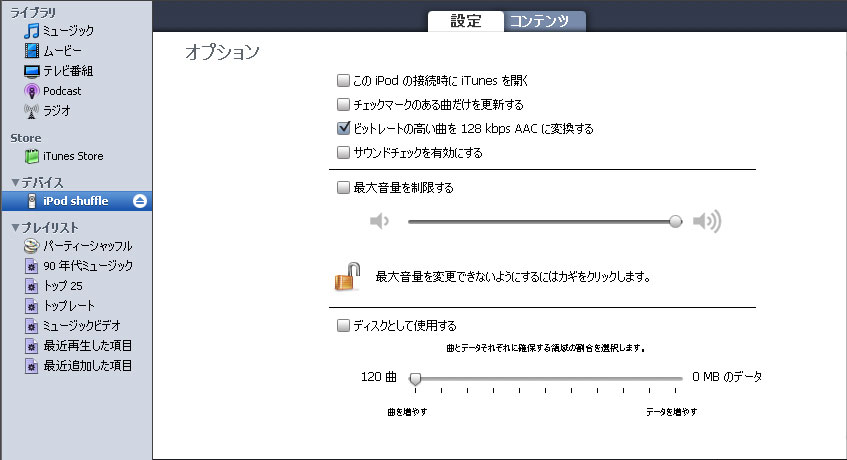
画面を下にスクロールするとiPod shuffleにとiTunesの曲の転送設定項目があります。<br />
<a href="http://www.ipod-podcast.jp/ipod/img/img3_shuffle_02.jpg" rel="lightbox[shuffle_0716]" title="iPod shuffleの転送設定"><img src="http://www.ipod-podcast.jp/ipod/img/thm3_shuffle_02.jpg" class="thumb" alt="iPod shuffleの転送設定" title="iPod shuffleの転送設定" width="250" height="135" /></a><br />
<br />
【設定項目】<br />
・<font color="blue">このiPodを接続時にiTunesを開く</font><br />
　→iPodを接続した時にiTunesも自動で起動されます。<br />
<br />
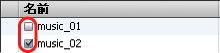
・<font color="blue">チェックマークのある曲だけを更新する</font><br />
　→ライブラリ中の下記のチェックマークがある曲を更新します。<br />
<img src="http://www.ipod-podcast.jp/ipod/img/img5_shuffle_04.jpg" class="pict" alt="iTunes チェックマークの曲" title="iTunes チェックマークの曲" width="220" height="53" /><br />
<br />
・<font color="blue">ビットレートの高い曲を128kbps AACに変換する</font><br />
　→高音質の音楽は1曲のデータ量が大きい為にshuffleには曲数があまり入らなくなってしまいます。このチェックをすると高音質で変換された音楽データをiPod shuffleに転送する際にAAC（比較的音質が良く、高圧縮とされている音楽データ形式）に変換しながらコピーします。<br />
<br />
・<font color="blue">サウンドチェックを有効にする</font><br />
　→曲が同じ音量レベルで再生されるように iPod shuffle を設定<br />
<br />
・<font color="blue">最大音量を制限する</font><br />
<br />
 title="iTunesのコンテンツタブ"　→iPod shuffleをフラッシュメモリなどと同じように外部ディスクとして使用する場合にチェック<br />
　→ディスクとして使用した場合、データと音楽の容量の配分を決められます。<br />
<br />
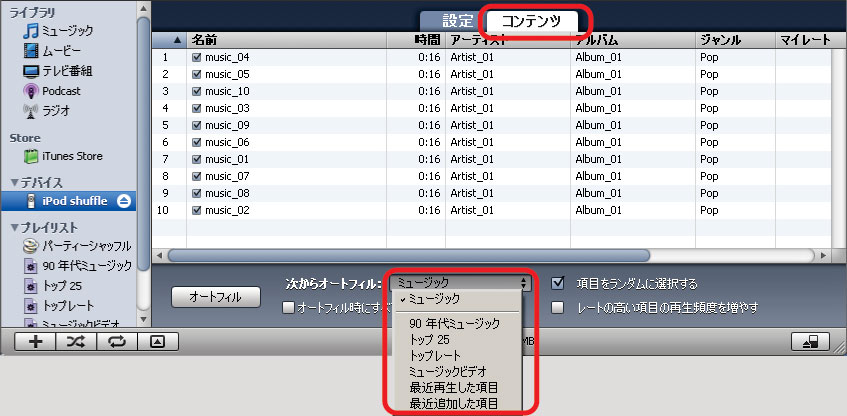
次に【コンテンツ】タブをクリックし転送する曲を選びます。<br />
コンテンツタブを押した時に、現在iPod shuffleに入っている曲が表示されます。<br />
<a href="http://www.ipod-podcast.jp/ipod/img/img6_shuffle_03.jpg" rel="lightbox[shuffle_0716]" title="iTunesのコンテンツタブ"><img src="http://www.ipod-podcast.jp/ipod/img/thm6_shuffle_03.jpg" class="thumb" alt="iTunesのコンテンツタブ" title="iTunesのコンテンツタブ" width="250" height="122" /></a><br />
<br />
・<font color="blue">次からオートフィル</font><br />
　→ミュージック＝ライブラリのミュージック全体を対象にする<br />
　　プルダウンでプレイリストやスマートプレイリストだけを対象にすることもできます。<br />
<a href="http://www.ipod-podcast.jp/ipod/ipod_list_89.html" target="_blank" title="プレイリスト・スマートプレイリスト">プレイリスト・スマートプレイリストの説明はこちら</a><br />
<br />
・<font color="blue">オートフィル時にすべての項目を置き換え</font><br />
　→左の【オートフィル】ボタンを押した時に全てのデータをいったん削除し、コピーし直す。<br />
<br />
・<font color="blue">項目をランダムに選択する</font><br />
　→iTunesがshuffleに転送する曲をランダム（無作為）にコピーする。<br />
<br />
・<font color="blue">レートの高い項目の再生頻度を増やす</font><br />
　→再生回数の高い曲を優先的にする。<br />
　　※ランダムに選択した場合のみ選択が可能です。<br />
<br />
以上の設定をして【オートフィル】ボタンを押せば曲がコピーされます。<br />
<br />
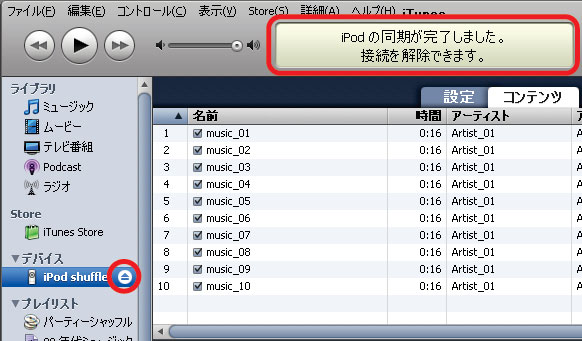
曲の転送（コピー）が完了したらiPod shuffleの接続を解除します。<br />
<br />
<a href="http://www.ipod-podcast.jp/ipod/img/img7_shuffle_05.jpg" rel="lightbox[shuffle_0716]" title="iPod shuffleの接続解除"><img src="http://www.ipod-podcast.jp/ipod/img/thm7_shuffle_05.jpg" class="thumb" alt="iPod shuffleの接続解除" title="iPod shuffleの接続解除" width="249" height="146" /></a><br />
<br />
まず上部に「iPodの同期が完了しました。接続が解除できます」というメッセージが出ていることを確認します。<br />
次に「デバイス」のiPod shuffleの右横にある▲ボタンを押して接続を解除。<br />
<br />
iPod shuffleのアイコンがiTunesから消えたら安全に接続の解除ができます。]]></content>
	</entry>
	<entry>
		<title>iPod shuffle　について</title>
		<link rel="alternate" type="text/html" href="http://www.ipod-podcast.jp/ipod/./eid33.html" />
		<id>http://www.ipod-podcast.jp/ipod/./eid33.html</id>
		<issued>2007-07-03T18:37:37+09:00</issued>
		<modified></modified>
		<summary>Apple iPod shuffle 1GB MA564J/Aおすすめ平均  イカシタ小さい奴とにかくカワイイ！2時間以上充電してもステータスランプが緑色に変わらない不具合小さくても音量はでかいよ！家族、恋人のプレゼントに最適？Ama...</summary>
		<author>
			<name>admin</name>
		</author>
		<dc:subject>iPodについて</dc:subject>
		<content mode="escaped" type="text/html" xml:lang="ja"><![CDATA[<table  border="0" cellpadding="5"><tr><td colspan="2" ><a href="http://www.amazon.co.jp/exec/obidos/ASIN/B000FSBJO8/ipodpodcast-22/ref=nosim/" target="_blank">Apple iPod shuffle 1GB MA564J/A</a></td></tr><tr><td valign="top"><a href="http://www.amazon.co.jp/exec/obidos/ASIN/B000FSBJO8/ipodpodcast-22/ref=nosim/" target="_blank"><img src="http://ec1.images-amazon.com/images/I/112TfmeKQVL.jpg" border="0" alt="Apple iPod shuffle 1GB MA564J/A" /></a></td><td valign="top"><font size="-1"><br /><iframe scrolling="no" frameborder="0" width="200" height="40" hspace="0" vspace="0" marginheight="0" marginwidth="0" src="http://webservices.amazon.co.jp/onca/xml?Service=AWSECommerceService&SubscriptionId=0G91FPYVW6ZGWBH4Y9G2&AssociateTag=goodpic-22&Operation=ItemLookup&IdType=ASIN&ContentType=text/html&Page=1&ResponseGroup=Offers&ItemId=B000FSBJO8&Version=2004-10-04&Style=http://www.g-tools.net/xsl/priceFFFFFF.xsl"></iframe><br /><strong>おすすめ平均  </strong><img src="http://g-images.amazon.com/images/G/01/detail/stars-4-5.gif" border="0" alt="star" /><br /><img src="http://g-images.amazon.com/images/G/01/detail/stars-5-0.gif" border="0" alt="star" />イカシタ小さい奴<br /><img src="http://g-images.amazon.com/images/G/01/detail/stars-4-0.gif" border="0" alt="star" />とにかくカワイイ！<br /><img src="http://g-images.amazon.com/images/G/01/detail/stars-5-0.gif" border="0" alt="star" />2時間以上充電してもステータスランプが緑色に変わらない不具合<br /><img src="http://g-images.amazon.com/images/G/01/detail/stars-4-0.gif" border="0" alt="star" />小さくても音量はでかいよ！<br /><img src="http://g-images.amazon.com/images/G/01/detail/stars-4-0.gif" border="0" alt="star" />家族、恋人のプレゼントに最適？<br /><br /><a href="http://www.amazon.co.jp/exec/obidos/ASIN/B000FSBJO8/ipodpodcast-22/ref=nosim/" target="_blank">Amazonで詳しく見る</a></font></td></tr></table><br />
<hr><br />
<table  border="0" cellpadding="5"><tr><td colspan="2" ><a href="http://www.amazon.co.jp/exec/obidos/ASIN/B000IDDSR6/ipodpodcast-22/ref=nosim/" target="_blank">Apple iPod shuffle 1GB ブルー MA949J/A</a></td></tr><tr><td valign="top"><a href="http://www.amazon.co.jp/exec/obidos/ASIN/B000IDDSR6/ipodpodcast-22/ref=nosim/" target="_blank"><img src="http://ec1.images-amazon.com/images/I/1191ZAjYMmL.jpg" border="0" alt="Apple iPod shuffle 1GB ブルー MA949J/A" /></a></td><td valign="top"><font size="-1"><br /><iframe scrolling="no" frameborder="0" width="200" height="40" hspace="0" vspace="0" marginheight="0" marginwidth="0" src="http://webservices.amazon.co.jp/onca/xml?Service=AWSECommerceService&SubscriptionId=0G91FPYVW6ZGWBH4Y9G2&AssociateTag=goodpic-22&Operation=ItemLookup&IdType=ASIN&ContentType=text/html&Page=1&ResponseGroup=Offers&ItemId=B000IDDSR6&Version=2004-10-04&Style=http://www.g-tools.net/xsl/priceFFFFFF.xsl"></iframe><br /><strong>おすすめ平均  </strong><img src="http://g-images.amazon.com/images/G/01/detail/stars-4-5.gif" border="0" alt="star" /><br /><img src="http://g-images.amazon.com/images/G/01/detail/stars-4-0.gif" border="0" alt="star" />子供のプレゼントにいかが？<br /><img src="http://g-images.amazon.com/images/G/01/detail/stars-5-0.gif" border="0" alt="star" />ビューティフル！<br /><img src="http://g-images.amazon.com/images/G/01/detail/stars-5-0.gif" border="0" alt="star" />な、なんて小さくて存在感があるんだ<br /><img src="http://g-images.amazon.com/images/G/01/detail/stars-5-0.gif" border="0" alt="star" />マジ最高!!(￣▽￣)<br /><img src="http://g-images.amazon.com/images/G/01/detail/stars-5-0.gif" border="0" alt="star" />このブルーは目立つ！<br /><br /><a href="http://www.amazon.co.jp/exec/obidos/ASIN/B000IDDSR6/ipodpodcast-22/ref=nosim/" target="_blank">Amazonで詳しく見る</a></font></td></tr></table><br />
<hr><br />
<table  border="0" cellpadding="5"><tr><td colspan="2" ><a href="http://www.amazon.co.jp/exec/obidos/ASIN/B000IDJA96/ipodpodcast-22/ref=nosim/" target="_blank">Apple iPod shuffle 1GB オレンジ MA953J/A</a></td></tr><tr><td valign="top"><a href="http://www.amazon.co.jp/exec/obidos/ASIN/B000IDJA96/ipodpodcast-22/ref=nosim/" target="_blank"><img src="http://ec1.images-amazon.com/images/I/11GJquSWpsL.jpg" border="0" alt="Apple iPod shuffle 1GB オレンジ MA953J/A" /></a></td><td valign="top"><font size="-1"><br /><iframe scrolling="no" frameborder="0" width="200" height="40" hspace="0" vspace="0" marginheight="0" marginwidth="0" src="http://webservices.amazon.co.jp/onca/xml?Service=AWSECommerceService&SubscriptionId=0G91FPYVW6ZGWBH4Y9G2&AssociateTag=goodpic-22&Operation=ItemLookup&IdType=ASIN&ContentType=text/html&Page=1&ResponseGroup=Offers&ItemId=B000IDJA96&Version=2004-10-04&Style=http://www.g-tools.net/xsl/priceFFFFFF.xsl"></iframe><br /><strong>おすすめ平均  </strong><img src="http://g-images.amazon.com/images/G/01/detail/stars-4-5.gif" border="0" alt="star" /><br /><img src="http://g-images.amazon.com/images/G/01/detail/stars-4-0.gif" border="0" alt="star" />目的次第<br /><img src="http://g-images.amazon.com/images/G/01/detail/stars-4-0.gif" border="0" alt="star" />オレンジもなかなかですね<br /><img src="http://g-images.amazon.com/images/G/01/detail/stars-5-0.gif" border="0" alt="star" />オレンジとか、色つきがbetter<br /><br /><a href="http://www.amazon.co.jp/exec/obidos/ASIN/B000IDJA96/ipodpodcast-22/ref=nosim/" target="_blank">Amazonで詳しく見る</a></font></td></tr></table><br />
<hr><br />
<table  border="0" cellpadding="5"><tr><td colspan="2" ><a href="http://www.amazon.co.jp/exec/obidos/ASIN/B000IDJA6E/ipodpodcast-22/ref=nosim/" target="_blank">Apple iPod shuffle 1GB グリーン MA951J/A</a></td></tr><tr><td valign="top"><a href="http://www.amazon.co.jp/exec/obidos/ASIN/B000IDJA6E/ipodpodcast-22/ref=nosim/" target="_blank"><img src="http://ec1.images-amazon.com/images/I/11CGToAuo3L.jpg" border="0" alt="Apple iPod shuffle 1GB グリーン MA951J/A" /></a></td><td valign="top"><font size="-1"><br /><iframe scrolling="no" frameborder="0" width="200" height="40" hspace="0" vspace="0" marginheight="0" marginwidth="0" src="http://webservices.amazon.co.jp/onca/xml?Service=AWSECommerceService&SubscriptionId=0G91FPYVW6ZGWBH4Y9G2&AssociateTag=goodpic-22&Operation=ItemLookup&IdType=ASIN&ContentType=text/html&Page=1&ResponseGroup=Offers&ItemId=B000IDJA6E&Version=2004-10-04&Style=http://www.g-tools.net/xsl/priceFFFFFF.xsl"></iframe><br /><strong>おすすめ平均  </strong><img src="http://g-images.amazon.com/images/G/01/detail/stars-4-5.gif" border="0" alt="star" /><br /><img src="http://g-images.amazon.com/images/G/01/detail/stars-4-0.gif" border="0" alt="star" />ちょっとした人へのプレゼントに<br /><img src="http://g-images.amazon.com/images/G/01/detail/stars-5-0.gif" border="0" alt="star" />新色が出たとのことで<br /><br /><a href="http://www.amazon.co.jp/exec/obidos/ASIN/B000IDJA6E/ipodpodcast-22/ref=nosim/" target="_blank">Amazonで詳しく見る</a></font></td></tr></table><br />
<hr><br />
<table  border="0" cellpadding="5"><tr><td colspan="2" ><a href="http://www.amazon.co.jp/exec/obidos/ASIN/B000IDHIUE/ipodpodcast-22/ref=nosim/" target="_blank">Apple iPod shuffle 1GB ピンク MA947J/A</a></td></tr><tr><td valign="top"><a href="http://www.amazon.co.jp/exec/obidos/ASIN/B000IDHIUE/ipodpodcast-22/ref=nosim/" target="_blank"><img src="http://ec1.images-amazon.com/images/I/116-Uxj-FHL.jpg" border="0" alt="Apple iPod shuffle 1GB ピンク MA947J/A" /></a></td><td valign="top"><font size="-1"><br /><iframe scrolling="no" frameborder="0" width="200" height="40" hspace="0" vspace="0" marginheight="0" marginwidth="0" src="http://webservices.amazon.co.jp/onca/xml?Service=AWSECommerceService&SubscriptionId=0G91FPYVW6ZGWBH4Y9G2&AssociateTag=goodpic-22&Operation=ItemLookup&IdType=ASIN&ContentType=text/html&Page=1&ResponseGroup=Offers&ItemId=B000IDHIUE&Version=2004-10-04&Style=http://www.g-tools.net/xsl/priceFFFFFF.xsl"></iframe><br /><strong>おすすめ平均  </strong><img src="http://g-images.amazon.com/images/G/01/detail/stars-4-5.gif" border="0" alt="star" /><br /><img src="http://g-images.amazon.com/images/G/01/detail/stars-5-0.gif" border="0" alt="star" />ちっちゃい！！<br /><img src="http://g-images.amazon.com/images/G/01/detail/stars-4-0.gif" border="0" alt="star" />このカラーは男性にはちょっと？<br /><br /><a href="http://www.amazon.co.jp/exec/obidos/ASIN/B000IDHIUE/ipodpodcast-22/ref=nosim/" target="_blank">Amazonで詳しく見る</a></font></td></tr></table>]]></content>
	</entry>
	<entry>
		<title>iPod nano について</title>
		<link rel="alternate" type="text/html" href="http://www.ipod-podcast.jp/ipod/./eid32.html" />
		<id>http://www.ipod-podcast.jp/ipod/./eid32.html</id>
		<issued>2007-07-03T18:24:42+09:00</issued>
		<modified></modified>
		<summary>Apple iPod nano 2GB シルバー MA477J/Aおすすめ平均  なんだかんだいってもipod半年で2GB埋まってしまった・・ノベルティでもらった転送早っ！AppleのスタンダードAmazonで詳しく見るApple iPod nano 4GB シルバ...</summary>
		<author>
			<name>admin</name>
		</author>
		<dc:subject>iPodについて</dc:subject>
		<content mode="escaped" type="text/html" xml:lang="ja"><![CDATA[<table  border="0" cellpadding="5"><tr><td colspan="2" ><a href="http://www.amazon.co.jp/exec/obidos/ASIN/B000FS7TY2/ipodpodcast-22/ref=nosim/" target="_blank">Apple iPod nano 2GB シルバー MA477J/A</a></td></tr><tr><td valign="top"><a href="http://www.amazon.co.jp/exec/obidos/ASIN/B000FS7TY2/ipodpodcast-22/ref=nosim/" target="_blank"><img src="http://ec1.images-amazon.com/images/I/1148YC87G7L.jpg" border="0" alt="Apple iPod nano 2GB シルバー MA477J/A" /></a></td><td valign="top"><font size="-1"><br /><iframe scrolling="no" frameborder="0" width="200" height="40" hspace="0" vspace="0" marginheight="0" marginwidth="0" src="http://webservices.amazon.co.jp/onca/xml?Service=AWSECommerceService&SubscriptionId=0G91FPYVW6ZGWBH4Y9G2&AssociateTag=goodpic-22&Operation=ItemLookup&IdType=ASIN&ContentType=text/html&Page=1&ResponseGroup=Offers&ItemId=B000FS7TY2&Version=2004-10-04&Style=http://www.g-tools.net/xsl/priceFFFFFF.xsl"></iframe><br /><strong>おすすめ平均  </strong><img src="http://g-images.amazon.com/images/G/01/detail/stars-4-0.gif" border="0" alt="star" /><br /><img src="http://g-images.amazon.com/images/G/01/detail/stars-4-0.gif" border="0" alt="star" />なんだかんだいってもipod<br /><img src="http://g-images.amazon.com/images/G/01/detail/stars-3-0.gif" border="0" alt="star" />半年で2GB埋まってしまった・・<br /><img src="http://g-images.amazon.com/images/G/01/detail/stars-5-0.gif" border="0" alt="star" />ノベルティでもらった<br /><img src="http://g-images.amazon.com/images/G/01/detail/stars-4-0.gif" border="0" alt="star" />転送早っ！<br /><img src="http://g-images.amazon.com/images/G/01/detail/stars-5-0.gif" border="0" alt="star" />Appleのスタンダード<br /><br /><a href="http://www.amazon.co.jp/exec/obidos/ASIN/B000FS7TY2/ipodpodcast-22/ref=nosim/" target="_blank">Amazonで詳しく見る</a></font></td></tr></table><br />
<hr><br />
<table  border="0" cellpadding="5"><tr><td colspan="2" ><a href="http://www.amazon.co.jp/exec/obidos/ASIN/B000FSEKPS/ipodpodcast-22/ref=nosim/" target="_blank">Apple iPod nano 4GB シルバー MA426J/A</a></td></tr><tr><td valign="top"><a href="http://www.amazon.co.jp/exec/obidos/ASIN/B000FSEKPS/ipodpodcast-22/ref=nosim/" target="_blank"><img src="http://ec1.images-amazon.com/images/I/1148YC87G7L.jpg" border="0" alt="Apple iPod nano 4GB シルバー MA426J/A" /></a></td><td valign="top"><font size="-1"><br /><iframe scrolling="no" frameborder="0" width="200" height="40" hspace="0" vspace="0" marginheight="0" marginwidth="0" src="http://webservices.amazon.co.jp/onca/xml?Service=AWSECommerceService&SubscriptionId=0G91FPYVW6ZGWBH4Y9G2&AssociateTag=goodpic-22&Operation=ItemLookup&IdType=ASIN&ContentType=text/html&Page=1&ResponseGroup=Offers&ItemId=B000FSEKPS&Version=2004-10-04&Style=http://www.g-tools.net/xsl/priceFFFFFF.xsl"></iframe><br /><strong>おすすめ平均  </strong><img src="http://g-images.amazon.com/images/G/01/detail/stars-4-5.gif" border="0" alt="star" /><br /><img src="http://g-images.amazon.com/images/G/01/detail/stars-5-0.gif" border="0" alt="star" />容量では４GBがおススメ。<br /><img src="http://g-images.amazon.com/images/G/01/detail/stars-5-0.gif" border="0" alt="star" />なくてはならない<br /><img src="http://g-images.amazon.com/images/G/01/detail/stars-4-0.gif" border="0" alt="star" />悪くないけど絶賛はしない<br /><img src="http://g-images.amazon.com/images/G/01/detail/stars-2-0.gif" border="0" alt="star" />音質がいまいち<br /><img src="http://g-images.amazon.com/images/G/01/detail/stars-1-0.gif" border="0" alt="star" />動画非対応じゃはなしにならない<br /><br /><a href="http://www.amazon.co.jp/exec/obidos/ASIN/B000FSEKPS/ipodpodcast-22/ref=nosim/" target="_blank">Amazonで詳しく見る</a></font></td></tr></table><br />
<hr><br />
<table  border="0" cellpadding="5"><tr><td colspan="2" ><a href="http://www.amazon.co.jp/exec/obidos/ASIN/B000IDDRWW/ipodpodcast-22/ref=nosim/" target="_blank">Apple iPod nano 4GB ピンク MA489J/A</a></td></tr><tr><td valign="top"><a href="http://www.amazon.co.jp/exec/obidos/ASIN/B000IDDRWW/ipodpodcast-22/ref=nosim/" target="_blank"><img src="http://ec1.images-amazon.com/images/I/2121GQTZRGL.jpg" border="0" alt="Apple iPod nano 4GB ピンク MA489J/A" /></a></td><td valign="top"><font size="-1"><br /><iframe scrolling="no" frameborder="0" width="200" height="40" hspace="0" vspace="0" marginheight="0" marginwidth="0" src="http://webservices.amazon.co.jp/onca/xml?Service=AWSECommerceService&SubscriptionId=0G91FPYVW6ZGWBH4Y9G2&AssociateTag=goodpic-22&Operation=ItemLookup&IdType=ASIN&ContentType=text/html&Page=1&ResponseGroup=Offers&ItemId=B000IDDRWW&Version=2004-10-04&Style=http://www.g-tools.net/xsl/priceFFFFFF.xsl"></iframe><br /><strong>おすすめ平均  </strong><img src="http://g-images.amazon.com/images/G/01/detail/stars-5-0.gif" border="0" alt="star" /><br /><img src="http://g-images.amazon.com/images/G/01/detail/stars-5-0.gif" border="0" alt="star" />確実に進化した第2世代iPod nano<br /><br /><a href="http://www.amazon.co.jp/exec/obidos/ASIN/B000IDDRWW/ipodpodcast-22/ref=nosim/" target="_blank">Amazonで詳しく見る</a></font></td></tr></table><br />
<hr><br />
<table  border="0" cellpadding="5"><tr><td colspan="2" ><a href="http://www.amazon.co.jp/exec/obidos/ASIN/B000IDDRTA/ipodpodcast-22/ref=nosim/" target="_blank">Apple iPod nano 4GB ブルー MA428J/A</a></td></tr><tr><td valign="top"><a href="http://www.amazon.co.jp/exec/obidos/ASIN/B000IDDRTA/ipodpodcast-22/ref=nosim/" target="_blank"><img src="http://ec1.images-amazon.com/images/I/21BCX9AJMXL.jpg" border="0" alt="Apple iPod nano 4GB ブルー MA428J/A" /></a></td><td valign="top"><font size="-1"><br /><iframe scrolling="no" frameborder="0" width="200" height="40" hspace="0" vspace="0" marginheight="0" marginwidth="0" src="http://webservices.amazon.co.jp/onca/xml?Service=AWSECommerceService&SubscriptionId=0G91FPYVW6ZGWBH4Y9G2&AssociateTag=goodpic-22&Operation=ItemLookup&IdType=ASIN&ContentType=text/html&Page=1&ResponseGroup=Offers&ItemId=B000IDDRTA&Version=2004-10-04&Style=http://www.g-tools.net/xsl/priceFFFFFF.xsl"></iframe><br /><strong>おすすめ平均  </strong><img src="http://g-images.amazon.com/images/G/01/detail/stars-4-5.gif" border="0" alt="star" /><br /><img src="http://g-images.amazon.com/images/G/01/detail/stars-5-0.gif" border="0" alt="star" />容量がちょうど良い<br /><img src="http://g-images.amazon.com/images/G/01/detail/stars-5-0.gif" border="0" alt="star" />便利ですｗ<br /><img src="http://g-images.amazon.com/images/G/01/detail/stars-5-0.gif" border="0" alt="star" />嘆願<br /><img src="http://g-images.amazon.com/images/G/01/detail/stars-4-0.gif" border="0" alt="star" />満足ですかね?<br /><img src="http://g-images.amazon.com/images/G/01/detail/stars-5-0.gif" border="0" alt="star" />最高です！<br /><br /><a href="http://www.amazon.co.jp/exec/obidos/ASIN/B000IDDRTA/ipodpodcast-22/ref=nosim/" target="_blank">Amazonで詳しく見る</a></font></td></tr></table><br />
<hr><br />
<table  border="0" cellpadding="5"><tr><td colspan="2" ><a href="http://www.amazon.co.jp/exec/obidos/ASIN/B000IDFEJG/ipodpodcast-22/ref=nosim/" target="_blank">Apple iPod nano 4GB グリーン MA487J/A</a></td></tr><tr><td valign="top"><a href="http://www.amazon.co.jp/exec/obidos/ASIN/B000IDFEJG/ipodpodcast-22/ref=nosim/" target="_blank"><img src="http://ec1.images-amazon.com/images/I/21PKAMBWD2L.jpg" border="0" alt="Apple iPod nano 4GB グリーン MA487J/A" /></a></td><td valign="top"><font size="-1"><br /><iframe scrolling="no" frameborder="0" width="200" height="40" hspace="0" vspace="0" marginheight="0" marginwidth="0" src="http://webservices.amazon.co.jp/onca/xml?Service=AWSECommerceService&SubscriptionId=0G91FPYVW6ZGWBH4Y9G2&AssociateTag=goodpic-22&Operation=ItemLookup&IdType=ASIN&ContentType=text/html&Page=1&ResponseGroup=Offers&ItemId=B000IDFEJG&Version=2004-10-04&Style=http://www.g-tools.net/xsl/priceFFFFFF.xsl"></iframe><br /><strong>おすすめ平均  </strong><img src="http://g-images.amazon.com/images/G/01/detail/stars-4-5.gif" border="0" alt="star" /><br /><img src="http://g-images.amazon.com/images/G/01/detail/stars-4-0.gif" border="0" alt="star" />無題<br /><img src="http://g-images.amazon.com/images/G/01/detail/stars-5-0.gif" border="0" alt="star" />i Ｐodデビュー<br /><img src="http://g-images.amazon.com/images/G/01/detail/stars-4-0.gif" border="0" alt="star" />イイ！けど、初心者にはとっつきにくい<br /><img src="http://g-images.amazon.com/images/G/01/detail/stars-5-0.gif" border="0" alt="star" />鮮やか爽やかな緑<br /><img src="http://g-images.amazon.com/images/G/01/detail/stars-5-0.gif" border="0" alt="star" />ついにここまで来たか<br /><br /><a href="http://www.amazon.co.jp/exec/obidos/ASIN/B000IDFEJG/ipodpodcast-22/ref=nosim/" target="_blank">Amazonで詳しく見る</a></font></td></tr></table><br />
<hr><br />
<table  border="0" cellpadding="5"><tr><td colspan="2" ><a href="http://www.amazon.co.jp/exec/obidos/ASIN/B000IDHI9A/ipodpodcast-22/ref=nosim/" target="_blank">Apple iPod nano 8GB ブラック MA497J/A</a></td></tr><tr><td valign="top"><a href="http://www.amazon.co.jp/exec/obidos/ASIN/B000IDHI9A/ipodpodcast-22/ref=nosim/" target="_blank"><img src="http://ec1.images-amazon.com/images/I/11M9PDEM6NL.jpg" border="0" alt="Apple iPod nano 8GB ブラック MA497J/A" /></a></td><td valign="top"><font size="-1"><br /><iframe scrolling="no" frameborder="0" width="200" height="40" hspace="0" vspace="0" marginheight="0" marginwidth="0" src="http://webservices.amazon.co.jp/onca/xml?Service=AWSECommerceService&SubscriptionId=0G91FPYVW6ZGWBH4Y9G2&AssociateTag=goodpic-22&Operation=ItemLookup&IdType=ASIN&ContentType=text/html&Page=1&ResponseGroup=Offers&ItemId=B000IDHI9A&Version=2004-10-04&Style=http://www.g-tools.net/xsl/priceFFFFFF.xsl"></iframe><br /><strong>おすすめ平均  </strong><img src="http://g-images.amazon.com/images/G/01/detail/stars-4-5.gif" border="0" alt="star" /><br /><img src="http://g-images.amazon.com/images/G/01/detail/stars-4-0.gif" border="0" alt="star" />音楽を聴くだけなら<br /><img src="http://g-images.amazon.com/images/G/01/detail/stars-3-0.gif" border="0" alt="star" />音楽を聴くために買いましたが・・・。<br /><img src="http://g-images.amazon.com/images/G/01/detail/stars-4-0.gif" border="0" alt="star" />あらゆる意味で妥協点<br /><img src="http://g-images.amazon.com/images/G/01/detail/stars-5-0.gif" border="0" alt="star" />かっこいい!!<br /><img src="http://g-images.amazon.com/images/G/01/detail/stars-5-0.gif" border="0" alt="star" />いい感じ<br /><br /><a href="http://www.amazon.co.jp/exec/obidos/ASIN/B000IDHI9A/ipodpodcast-22/ref=nosim/" target="_blank">Amazonで詳しく見る</a></font></td></tr></table>]]></content>
	</entry>
	<entry>
		<title>iPod G5 30G/80G</title>
		<link rel="alternate" type="text/html" href="http://www.ipod-podcast.jp/ipod/./eid31.html" />
		<id>http://www.ipod-podcast.jp/ipod/./eid31.html</id>
		<issued>2007-07-03T17:06:17+09:00</issued>
		<modified></modified>
		<summary>Apple iPod 30GB ホワイト MA444J/Aおすすめ平均  悪くはないが毎日使ってます！！miniから乗り換え毎日の生活には欠かせない期待通りAmazonで詳しく見るApple iPod 30GB ブラック MA446J/Aおすすめ平均  ノイズが...</summary>
		<author>
			<name>admin</name>
		</author>
		<dc:subject>iPodについて</dc:subject>
		<content mode="escaped" type="text/html" xml:lang="ja"><![CDATA[<table  border="0" cellpadding="5"><tr><td colspan="2" ><a href="http://www.amazon.co.jp/exec/obidos/ASIN/B000IDDS3U/ipodpodcast-22/ref=nosim/" target="_blank">Apple iPod 30GB ホワイト MA444J/A</a></td></tr><tr><td valign="top"><a href="http://www.amazon.co.jp/exec/obidos/ASIN/B000IDDS3U/ipodpodcast-22/ref=nosim/" target="_blank"><img src="http://ec1.images-amazon.com/images/I/215J5B7SKTL.jpg" border="0" alt="Apple iPod 30GB ホワイト MA444J/A" /></a></td><td valign="top"><font size="-1"><br /><iframe scrolling="no" frameborder="0" width="200" height="40" hspace="0" vspace="0" marginheight="0" marginwidth="0" src="http://webservices.amazon.co.jp/onca/xml?Service=AWSECommerceService&SubscriptionId=0G91FPYVW6ZGWBH4Y9G2&AssociateTag=goodpic-22&Operation=ItemLookup&IdType=ASIN&ContentType=text/html&Page=1&ResponseGroup=Offers&ItemId=B000IDDS3U&Version=2004-10-04&Style=http://www.g-tools.net/xsl/priceFFFFFF.xsl"></iframe><br /><strong>おすすめ平均  </strong><img src="http://g-images.amazon.com/images/G/01/detail/stars-4-0.gif" border="0" alt="star" /><br /><img src="http://g-images.amazon.com/images/G/01/detail/stars-3-0.gif" border="0" alt="star" />悪くはないが<br /><img src="http://g-images.amazon.com/images/G/01/detail/stars-5-0.gif" border="0" alt="star" />毎日使ってます！！<br /><img src="http://g-images.amazon.com/images/G/01/detail/stars-4-0.gif" border="0" alt="star" />miniから乗り換え<br /><img src="http://g-images.amazon.com/images/G/01/detail/stars-5-0.gif" border="0" alt="star" />毎日の生活には欠かせない<br /><img src="http://g-images.amazon.com/images/G/01/detail/stars-4-0.gif" border="0" alt="star" />期待通り<br /><br /><a href="http://www.amazon.co.jp/exec/obidos/ASIN/B000IDDS3U/ipodpodcast-22/ref=nosim/" target="_blank">Amazonで詳しく見る</a></font></td></tr></table><br />
<hr><br />
<table  border="0" cellpadding="5"><tr><td colspan="2" ><a href="http://www.amazon.co.jp/exec/obidos/ASIN/B000IDJ9GK/ipodpodcast-22/ref=nosim/" target="_blank">Apple iPod 30GB ブラック MA446J/A</a></td></tr><tr><td valign="top"><a href="http://www.amazon.co.jp/exec/obidos/ASIN/B000IDJ9GK/ipodpodcast-22/ref=nosim/" target="_blank"><img src="http://ec1.images-amazon.com/images/I/212TE4EFR8L.jpg" border="0" alt="Apple iPod 30GB ブラック MA446J/A" /></a></td><td valign="top"><font size="-1"><br /><iframe scrolling="no" frameborder="0" width="200" height="40" hspace="0" vspace="0" marginheight="0" marginwidth="0" src="http://webservices.amazon.co.jp/onca/xml?Service=AWSECommerceService&SubscriptionId=0G91FPYVW6ZGWBH4Y9G2&AssociateTag=goodpic-22&Operation=ItemLookup&IdType=ASIN&ContentType=text/html&Page=1&ResponseGroup=Offers&ItemId=B000IDJ9GK&Version=2004-10-04&Style=http://www.g-tools.net/xsl/priceFFFFFF.xsl"></iframe><br /><strong>おすすめ平均  </strong><img src="http://g-images.amazon.com/images/G/01/detail/stars-3-5.gif" border="0" alt="star" /><br /><img src="http://g-images.amazon.com/images/G/01/detail/stars-3-0.gif" border="0" alt="star" />ノイズが…… <br /><img src="http://g-images.amazon.com/images/G/01/detail/stars-5-0.gif" border="0" alt="star" />２台目のiPodです<br /><img src="http://g-images.amazon.com/images/G/01/detail/stars-2-0.gif" border="0" alt="star" />操作性は最高だが・・・<br /><img src="http://g-images.amazon.com/images/G/01/detail/stars-1-0.gif" border="0" alt="star" />ギャンブルな２８０００\<br /><img src="http://g-images.amazon.com/images/G/01/detail/stars-1-0.gif" border="0" alt="star" />届いて2日目にフリーズしました<br /><br /><a href="http://www.amazon.co.jp/exec/obidos/ASIN/B000IDJ9GK/ipodpodcast-22/ref=nosim/" target="_blank">Amazonで詳しく見る</a></font></td></tr></table><br />
<hr><br />
<table  border="0" cellpadding="5"><tr><td colspan="2" ><a href="http://www.amazon.co.jp/exec/obidos/ASIN/B000IDFEZU/ipodpodcast-22/ref=nosim/" target="_blank">Apple iPod 80GB ホワイト MA448J/A</a></td></tr><tr><td valign="top"><a href="http://www.amazon.co.jp/exec/obidos/ASIN/B000IDFEZU/ipodpodcast-22/ref=nosim/" target="_blank"><img src="http://ec1.images-amazon.com/images/I/215J5B7SKTL.jpg" border="0" alt="Apple iPod 80GB ホワイト MA448J/A" /></a></td><td valign="top"><font size="-1"><br /><iframe scrolling="no" frameborder="0" width="200" height="40" hspace="0" vspace="0" marginheight="0" marginwidth="0" src="http://webservices.amazon.co.jp/onca/xml?Service=AWSECommerceService&SubscriptionId=0G91FPYVW6ZGWBH4Y9G2&AssociateTag=goodpic-22&Operation=ItemLookup&IdType=ASIN&ContentType=text/html&Page=1&ResponseGroup=Offers&ItemId=B000IDFEZU&Version=2004-10-04&Style=http://www.g-tools.net/xsl/priceFFFFFF.xsl"></iframe><br /><strong>おすすめ平均  </strong><img src="http://g-images.amazon.com/images/G/01/detail/stars-4-5.gif" border="0" alt="star" /><br /><img src="http://g-images.amazon.com/images/G/01/detail/stars-5-0.gif" border="0" alt="star" />８０ＧＢで十分！！<br /><img src="http://g-images.amazon.com/images/G/01/detail/stars-5-0.gif" border="0" alt="star" />iPODシリーズ最大容量・最新の５・５世代！<br /><img src="http://g-images.amazon.com/images/G/01/detail/stars-4-0.gif" border="0" alt="star" />個人的に満足<br /><img src="http://g-images.amazon.com/images/G/01/detail/stars-5-0.gif" border="0" alt="star" />あと数ヶ月待てばよかった･･･<br /><img src="http://g-images.amazon.com/images/G/01/detail/stars-5-0.gif" border="0" alt="star" />最高です<br /><br /><a href="http://www.amazon.co.jp/exec/obidos/ASIN/B000IDFEZU/ipodpodcast-22/ref=nosim/" target="_blank">Amazonで詳しく見る</a></font></td></tr></table><br />
<hr><br />
<table  border="0" cellpadding="5"><tr><td colspan="2" ><a href="http://www.amazon.co.jp/exec/obidos/ASIN/B000IDHIM2/ipodpodcast-22/ref=nosim/" target="_blank">Apple iPod 80GB ブラック MA450J/A</a></td></tr><tr><td valign="top"><a href="http://www.amazon.co.jp/exec/obidos/ASIN/B000IDHIM2/ipodpodcast-22/ref=nosim/" target="_blank"><img src="http://ec1.images-amazon.com/images/I/212TE4EFR8L.jpg" border="0" alt="Apple iPod 80GB ブラック MA450J/A" /></a></td><td valign="top"><font size="-1"><br /><iframe scrolling="no" frameborder="0" width="200" height="40" hspace="0" vspace="0" marginheight="0" marginwidth="0" src="http://webservices.amazon.co.jp/onca/xml?Service=AWSECommerceService&SubscriptionId=0G91FPYVW6ZGWBH4Y9G2&AssociateTag=goodpic-22&Operation=ItemLookup&IdType=ASIN&ContentType=text/html&Page=1&ResponseGroup=Offers&ItemId=B000IDHIM2&Version=2004-10-04&Style=http://www.g-tools.net/xsl/priceFFFFFF.xsl"></iframe><br /><strong>おすすめ平均  </strong><img src="http://g-images.amazon.com/images/G/01/detail/stars-3-5.gif" border="0" alt="star" /><br /><img src="http://g-images.amazon.com/images/G/01/detail/stars-4-0.gif" border="0" alt="star" />重いです…<br /><img src="http://g-images.amazon.com/images/G/01/detail/stars-4-0.gif" border="0" alt="star" />白に続き黒までも購入<br /><img src="http://g-images.amazon.com/images/G/01/detail/stars-3-0.gif" border="0" alt="star" />初心者に優しい機種ではあるが、まだまだ改良の余地がある。<br /><img src="http://g-images.amazon.com/images/G/01/detail/stars-3-0.gif" border="0" alt="star" />良くも悪くも…<br /><img src="http://g-images.amazon.com/images/G/01/detail/stars-3-0.gif" border="0" alt="star" />改善されてない発色数<br /><br /><a href="http://www.amazon.co.jp/exec/obidos/ASIN/B000IDHIM2/ipodpodcast-22/ref=nosim/" target="_blank">Amazonで詳しく見る</a></font></td></tr></table>]]></content>
	</entry>
	<entry>
		<title>iPod shuffleの曲順が変わってしまう？？</title>
		<link rel="alternate" type="text/html" href="http://www.ipod-podcast.jp/ipod/./eid29.html" />
		<id>http://www.ipod-podcast.jp/ipod/./eid29.html</id>
		<issued>2007-06-28T11:49:50+09:00</issued>
		<modified></modified>
		<summary>iPod shuffleの曲順が変わってしまう？？</summary>
		<author>
			<name>admin</name>
		</author>
		<dc:subject>iPodのトラブル</dc:subject>
		<content mode="escaped" type="text/html" xml:lang="ja"><![CDATA[先日、iPod shuffleの曲順が変わってしまうというコメントを2件頂きました。<br />
<br />
自分では現象を確認しておりませんが同じ症状が2例出ているって事は他にも困っている方がいるかと思い記載します。<br />
<br />
<blockquote>下田様<br />
6月 19th, 2007 at 21:30:25<br />
ipod shuffleを使っていて、この前までは曲順も自由に変えられたのですが<br />
今では勝手に曲順が並び替えられて曲順も自分では移動できなくなりました。<br />
itunesをアップグレードしてからだと思うのですが・・・<br />
どこか設定がおかしくなってしまったのでしょうか？<br />
</blockquote><br />
<br />
<blockquote>てん様<br />
6月 24th, 2007 at 11:18:45   edit <br />
私も同じ現象が起きました。<br />
iTunes　iPod　設定　バージョン　を復元したら戻りました。<br />
バグなんでしょうか？<br />
2007/07/01にソフトの更新があるようですが。　<br />
</blockquote><br />
<br />
※ver.7.2から7.3にVer.upされた時にiTunesの並び順が変わったようですね。<br />
<a href="http://www.ipod-podcast.jp/itunes/eid34.html" title="iTunesの曲順">iTunesの曲順</a>]]></content>
	</entry>
	<entry>
		<title>iTunes StoreのDRMの解除について</title>
		<link rel="alternate" type="text/html" href="http://www.ipod-podcast.jp/ipod/./its_drm.html" />
		<id>http://www.ipod-podcast.jp/ipod/./its_drm.html</id>
		<issued>2007-06-18T23:00:32+09:00</issued>
		<modified></modified>
		<summary>iTunes Storeで購入した音楽はDRM【デジタル著作権管理】 (Digital Rights Management)がかかっている為、再生するPCが制限されたり、iPod以外のポータブルプレーヤーに転送できなかったりします。現在、iTunes S...</summary>
		<author>
			<name>admin</name>
		</author>
		<dc:subject>iPodのトラブル</dc:subject>
		<content mode="escaped" type="text/html" xml:lang="ja"><![CDATA[<strong>iTunes Store</strong>で購入した音楽は<strong>DRM</strong>【デジタル著作権管理】 (Digital Rights Management)がかかっている為、再生するPCが制限されたり、<strong>iPod</strong>以外のポータブルプレーヤーに転送できなかったりします。<br />
<br />
現在、<em>iTunes Store</em>（iTS）では<em>DRM</em>なしでの楽曲の提供する方向で進んでいますのでしばらくのあいだ我慢！<br />
<br />
ただiTSのDRM付の楽曲のDRMを解除するソフトがあるようです。<br />
※自分はDRM解除した事がないので調べた情報だけを記載します。<br />
<br />
<em>DRM</em>解除ソフトの名前は<strong>QTFairUse6</strong>というソフトです。<br />
検索してみればいくつか情報が出てくると思います。<br />
iTunesのバージョンも上がっていますので、現在もDRM解除ができるのかは定かではありません。<br />
<br />
著作権管理のシステムを強制的に解除するという行為は法律上問題がありますので確かめてみたい方も個人の責任において行って下さい。]]></content>
	</entry>
	<entry>
		<title>Napsterの音楽はDRMを解除しないとiPodでは再生できない</title>
		<link rel="alternate" type="text/html" href="http://www.ipod-podcast.jp/ipod/./napster.html" />
		<id>http://www.ipod-podcast.jp/ipod/./napster.html</id>
		<issued>2007-06-18T22:01:36+09:00</issued>
		<modified></modified>
		<summary>最近NapsterのDRM【デジタル著作権管理】 (Digital Rights Management)についての質問が来ているので知っている範囲でまとめておきます。まずNapsterについて。Napster TO GOは月額1,980円で300万曲以上の曲が聴き...</summary>
		<author>
			<name>admin</name>
		</author>
		<dc:subject>iPodのトラブル</dc:subject>
		<content mode="escaped" type="text/html" xml:lang="ja"><![CDATA[最近<strong>Napster</strong>の<strong>DRM</strong>【デジタル著作権管理】 (Digital Rights Management)についての質問が来ているので知っている範囲でまとめておきます。<br />
<br />
まず<em>Napster</em>について。<br />
Napster TO GOは月額1,980円で300万曲以上の曲が聴き放題<br />
Napster Basicは月額1,280円で300万曲以上の曲が聴き放題<br />
になるサービスです。<br />
「TO GO」はNapster対応の携帯電話（NTT DoCoMo系）かポータブルプレーヤーに転送でき、「Basic」はPCでの再生に限定されます。<br />
<br />
ここで問題なのは、ポータブルプレイヤーに<strong>iPod</strong>が含まれていない点、PCのプレーヤーに<strong>iTunes</strong>が含まれていない点です。<br />
また、Napster解約時に曲が聴けなくなってしまう点です。<br />
<br />
これらを制御しているのが<strong>Windows Media DRM</strong>です。<br />
<br />
実はこの<em>DRM</em>を解除するソフトがネットで出回っています。<br />
<strong>FairUse4WM</strong>というソフトです。<br />
<br />
<em>FairUse4WM</em>で検索をかけてみれば情報がいくつか出てくると思います。FairUse4WMでDRM解除をすればiTunesで認識ができ、iPodへの転送も可能になるようです。<br />
ただし・・<br />
Windows Media Player 11（WMP11）をインストールしてしまうとDRM解除はできなくなってしまうようです。<br />
WMP11をインストールした後でWMP10にバージョンを落としても解除できないとの事。<br />
また、この手の技術は日々進化しているので今現在もDRMを解除できるとは保障できません。<br />
著作権管理のシステムを強制的に解除するという行為は法律上問題がありますので確かめてみたい方も個人の責任において行って下さい。]]></content>
	</entry>
	<entry>
		<title>マイレートについて</title>
		<link rel="alternate" type="text/html" href="http://www.ipod-podcast.jp/ipod/./ipod_list_88.html" />
		<id>http://www.ipod-podcast.jp/ipod/./ipod_list_88.html</id>
		<issued>2007-06-17T08:23:47+09:00</issued>
		<modified></modified>
		<summary>iTunes、iPodのマイレートについて</summary>
		<author>
			<name>admin</name>
		</author>
		<dc:subject>iPodの使い方</dc:subject>
		<content mode="escaped" type="text/html" xml:lang="ja"><![CDATA[<strong>マイレート</strong>はユーザーが<strong>iTunes</strong>で曲を管理するためのオプション項目で★0〜5までを利用できます。<br />
最初は便利な使い方が分からなかったのですが、使い方次第でとても役立ちます。<br />
特に<strong>iPod</strong>との連携では。<br />
<br />
<a href="http://www.ipod-podcast.jp/img/itunes_0122.jpg" rel="lightbox" title="iTunesのマイレートについて"><img src="http://www.ipod-podcast.jp/img/_itunes_0122.jpg" width="250" height="183" alt="iTunesのマイレートについて" title="iTunesのマイレートについて" class="iimage" /></a><a href="http://www.ipod-podcast.jp/img/itunes_0122.jpg" rel="lightbox" title="iTunesのマイレートについて">※画像拡大</a><br />
<br />
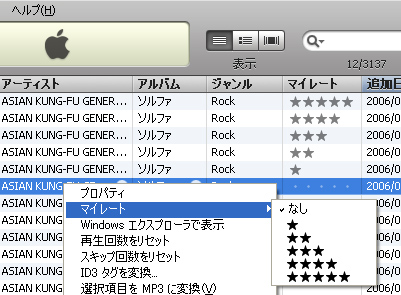
このように曲を選んで右クリックで「マイレート」星の数を選択。もしくは曲を選択した状態で点が5つ[・・・・・]と表示されるので、付けたい星の数の上の点（星を3つ付けるのであれば、三番目の・を）をクリックすることで★マークが付きます。<br />
<br />
普通に考えたら★→★★★★★でお気に入り度で利用する事しか想定してませんでしたが、<br />
★＝音飛び、ノイズ（削除もしくは取り直し対象）<br />
★★＝ボリュームが小さい<br />
★★★＝バラード系お気に入り<br />
★★★★＝カラオケ覚える用<br />
★★★★★＝ハイテンション系お気に入り<br />
<br />
などとルール決めをしておくと便利に使えます。<br />
<br />
iPodでもOn-The-Goプレイリスト（後述）を使えばプレイリストの作成はできますが、マイレートを使えばもっと簡単で自由に<a href="http://www.ipod-podcast.jp/ipod/ipod_list_89.html">(スマート)プレイリスト</a>の修正が可能です。<br />
<br />
新しいアルバムから曲をiTunes→iPodに入れた時、同じアルバムの中でも曲の雰囲気は違うので気分に応じて聴きたい曲とそうでない曲が混ざっていると思います。<br />
<br />
※<a href="http://www.ipod-podcast.jp/ipod/ipod_0109_70.html">同じアーティストやアルバムであればアーティスト名やアルバム名で絞り込むこともできますし・・。</a><br />
<br />
スマートプレイリストで<br />
[マイレートが][★★★][である]や<br />
[マイレートが][★★★★][以上]など<br />
のスマートプレイリストを作成しておけば、入れたばかりの曲を聴きながら<a href="http://www.ipod-podcast.jp/ipod/ipod_0109_72.html">iPodの操作で★の数を操作する</a>だけでスマートプレイリストの曲目を操作することができます。<br />
<br />
また長い間、同じ曲を聴き続けて飽きたのでスマートプレイリストから外したい・・といった操作もマイレートを利用したスマートプレイリストならiPodから操作できます。<br />
<br />
<hr /><br />
関連記事<br />
→　<a href="http://www.ipod-podcast.jp/ipod/ipod_list_89.html">スマートプレイリスト</a><br />
→　<a href="http://www.ipod-podcast.jp/ipod/ipod_0109_72.html">iPodの画面切り替え</a>]]></content>
	</entry>
	<entry>
		<title>ipodでヘッドホン・イヤホンを選ぶコツ</title>
		<link rel="alternate" type="text/html" href="http://www.ipod-podcast.jp/ipod/./index06.html" />
		<id>http://www.ipod-podcast.jp/ipod/./index06.html</id>
		<issued>2007-06-16T21:46:03+09:00</issued>
		<modified></modified>
		<summary>iPodのイヤホン・ヘッドホンを買い換える時に</summary>
		<author>
			<name>admin</name>
		</author>
		<dc:subject>iPod関連グッズ</dc:subject>
		<content mode="escaped" type="text/html" xml:lang="ja"><![CDATA[<strong>iPod</strong>には<strong>イヤホン</strong>が付属していますがいい音で音楽を聞きたい方やイヤホンが壊れてしまった場合には購入しなおす必要があります。<br />
先日、付属のイヤホンから買い替えをしたら確かに音は良くなりました。<br />
でも、一般的に（自分もですが）カタログを見てスペックを比較しても良く分からないので、<strong>イヤホン</strong>や<strong>ヘッドホン</strong>を買い換える時に自分が気にした内容をまとめてみます。<br />
<br />
<hr /><br />
<font color="#ff0000">チェック1：イヤホンコードの種類</font><br />
<br />
イヤホンコードにはネックストラップ型、Y字型、U字型があります。<br />
<br />
【ネックストラップ型】<br />
<img width="162" src="http://www.ipod-podcast.jp/img/ipod_0506_01.jpg" alt="ネックストラップ型" height="210" title="ネックストラップ型" class="iimage" /><br />
首からぶら下げることを念頭に作られていますので、軽量な<strong>iPod</strong> <strong>nano</strong>やiPod shuffle(昔のスティックタイプ)に向いていると思います。<br />
※iPod G5を首から下げるには重過ぎると思いますし、iPod shuffleはクリップ式になっていますので首から下げなくてもいいと思います。<br />
<br />
【Y字型】<br />
<img width="162" src="http://www.ipod-podcast.jp/img/ipod_0506_02.jpg" alt="Y字型" height="210" title="Y字型" class="iimage" /><br />
左右のコードの長さが対象ですのできれいに巻きつけたり、収納できます。<br />
<br />
【U字型】<br />
<img width="162" src="http://www.ipod-podcast.jp/img/ipod_0506_03.jpg" alt="U字型" height="210" title="U字型" class="iimage" /><br />
左右のコードが対象ではないので、体のセンターにコードが来ないので邪魔になりにくいです。<br />
<br />
<hr /><br />
<font color="#ff0000">チェック2：イヤホンのタイプ</font><br />
<br />
【スタンダードタイプ】<br />
<a href="http://www.amazon.co.jp/gp/redirect.html%3FASIN=B000FWGSAO%26tag=ipodpodcast-22%26lcode=xm2%26cID=2025%26ccmID=165953%26location=/o/ASIN/B000FWGSAO%253FSubscriptionId=1N9AHEAQ2F6SVD97BE02" title="Click and drag this image to the post editor"><img width="160" src="http://ec1.images-amazon.com/images/I/11JRFHQDZ5L.jpg" /></a><br />
iPod購入の際に付属するタイプと同様。<br />
<br />
<br />
【インナーイヤータイプ】<br />
<a href="http://www.amazon.co.jp/gp/redirect.html%3FASIN=B000KT7QOE%26tag=ipodpodcast-22%26lcode=xm2%26cID=2025%26ccmID=165953%26location=/o/ASIN/B000KT7QOE%253FSubscriptionId=1N9AHEAQ2F6SVD97BE02" title="Click and drag this image to the post editor"><img width="110" src="http://ec1.images-amazon.com/images/I/110PF3YCQ7L.jpg" /></a><br />
音漏れしにくい耳にフィットするタイプのイヤホンです。<br />
S/M/Lのサイズの違うイヤーピースが付属しているものが多いようです。<br />
<br />
<br />
【イヤークリップ(耳かけ)タイプ】<br />
<a href="http://www.amazon.co.jp/gp/redirect.html%3FASIN=B000FWGS6I%26tag=ipodpodcast-22%26lcode=xm2%26cID=2025%26ccmID=165953%26location=/o/ASIN/B000FWGS6I%253FSubscriptionId=1N9AHEAQ2F6SVD97BE02" title="Click and drag this image to the post editor"><img width="151" src="http://ec1.images-amazon.com/images/I/217Z6GT95ML.jpg" /></a><br />
ジム通いやランニングなどスポーツをする方にはオススメのタイプです。<br />
<br />
<hr /><br />
<font color="#ff0000">チェック3：コードの長さ</font><br />
<br />
0.3m~1.0m位まであります。短いコードのものは別に延長用コードが付属しているものが多いようです。<br />
コードの途中で連結するパーツがくるのが嫌な方は最初から長めのものを購入した方がよいかもしれません。<br />
<br />
<br />
<hr /><br />
<font color="#ff0000">ヘッドホンタイプ</font><br />
<br />
<img width="162" src="http://www.ipod-podcast.jp/img/ipod_0506_04.jpg" alt="ヘッドホンタイプ" height="210" title="ヘッドホンタイプ" class="iimage" /><br />
オーバーヘッドタイプのコードが両側から出ているタイプ<br />
<br />
<img width="162" src="http://www.ipod-podcast.jp/img/ipod_0506_05.jpg" alt="ヘッドホンタイプ（片だし）" height="210" title="ヘッドホンタイプ（片だし）" class="iimage" /><br />
オーバーヘッドタイプのコードを片方から出したタイプ<br />
<br />
<img width="162" src="http://www.ipod-podcast.jp/img/ipod_0506_06.jpg" alt="ネックバンドタイプ" height="210" title="ネックバンドタイプ" class="iimage" /><br />
髪型が崩れにくくなるようにアームの部分を後方にしたタイプ<br />
<br />
カタログのスペックの意味が分からなくても、どの（タイプの）イヤホン・ヘッドホンが自分に合うかの判断の参考にはなったでしょうか。]]></content>
	</entry>
	<entry>
		<title>iTunesがiPodを認識しない</title>
		<link rel="alternate" type="text/html" href="http://www.ipod-podcast.jp/ipod/./ipod_trouble_104.html" />
		<id>http://www.ipod-podcast.jp/ipod/./ipod_trouble_104.html</id>
		<issued>2007-06-16T21:44:16+09:00</issued>
		<modified></modified>
		<summary>iTunesがiPodを認識しない</summary>
		<author>
			<name>admin</name>
		</author>
		<dc:subject>iPodのトラブル</dc:subject>
		<content mode="escaped" type="text/html" xml:lang="ja"><![CDATA[<strong>iTunes</strong>が<strong>iPod</strong>を認識しない場合、複数の原因が考えられますのでいくつかの方法を確認してください。<br />
<br />
<span class="num">1</span>　iPodがフリーズしている場合。<br />
<br />
<a href="http://www.ipod-podcast.jp/img/ipod_0204_1.jpg" rel="lightbox[ipod_0204_3]" title="iPodのリセット。MENUボタンと選択ボタンを同時に6〜10秒押す"><img src="http://www.ipod-podcast.jp/img/_ipod_0204_1.jpg" width="152" height="250" alt="iPodのリセット。MENUボタンと選択ボタンを同時に6〜10秒押す" title="iPodのリセット。MENUボタンと選択ボタンを同時に6〜10秒押す" class="iimage" /></a><a href="http://www.ipod-podcast.jp/img/ipod_0204_1.jpg" rel="lightbox[ipod_0204_3]" title="iPodのリセット。MENUボタンと選択ボタンを同時に6〜10秒押す">※画像拡大</a><br />
<br />
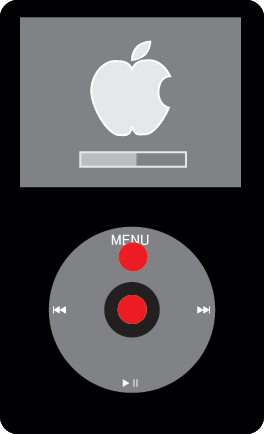
「MENU」ボタンと「選択」ボタンを同時に6〜10秒押してiPodをリセットした状態で接続してみて下さい。<br />
<br />
<span class="num">2</span>　接続したUSBの問題の可能性もあります。<br />
別のUSBポートに差し込んでみて下さい。<br />
<br />
<span class="num">3</span>　PCの問題（フリーズ・コンフリクトしている場合）も考えられます。<br />
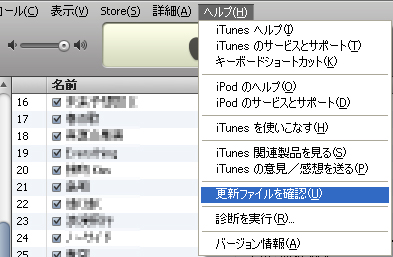
iTunesの操作が可能であればiTunesのソフトが最新か確認します。<br />
<br />
<a href="http://www.ipod-podcast.jp/img/ipod_0204_4.jpg" rel="lightbox[ipod_0204_3]" title="iTunesのVer.が最新か確認します。"><img src="http://www.ipod-podcast.jp/img/_ipod_0204_4.jpg" width="250" height="163" alt="iTunesのVer.が最新か確認します。" title="iTunesのVer.が最新か確認します。" class="iimage" /></a><a href="http://www.ipod-podcast.jp/img/ipod_0204_4.jpg" rel="lightbox[ipod_0204_3]" title="iTunesのVer.が最新か確認します。">※画像拡大</a><br />
PCの問題の場合、再起動した方が良いので、どうせなら最新Ver.のiTunesを入れておいたら良いと思います。<br />
<br />
再起動後、iTunesを立ち上げてiPodを再度接続してみて下さい。<br />
<br />
それでもだめな場合は・・<br />
<span class="num">4</span>　iTunesのソフトを一旦削除し、再インストールしてみるしかないと思います。<br />
<br />
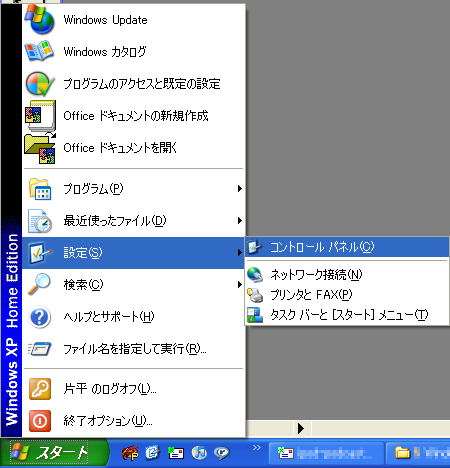
「スタート」メニューから「設定」→「コントロールパネル」を開きます。<br />
<a href="http://www.ipod-podcast.jp/img/ipod_0204_5.jpg" rel="lightbox[ipod_0204_3]" title="iTunesの削除。コントロールパネルを開く"><img src="http://www.ipod-podcast.jp/img/_ipod_0204_5.jpg" width="240" height="250" alt="iTunesの削除。コントロールパネルを開く" title="iTunesの削除。コントロールパネルを開く" class="iimage" /></a><a href="http://www.ipod-podcast.jp/img/ipod_0204_5.jpg" rel="lightbox[ipod_0204_3]" title="iTunesの削除。コントロールパネルを開く">※画像拡大</a><br />
<br />
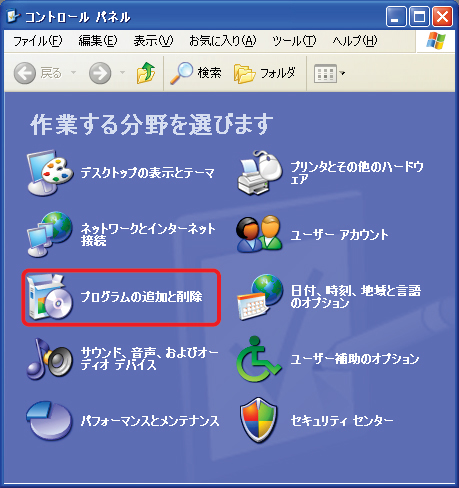
「コントロールパネル」から「プログラムの追加と削除」を選択。<br />
<br />
<a href="http://www.ipod-podcast.jp/img/ipod_0204_6.jpg" rel="lightbox[ipod_0204_3]" title="iTunesの削除。プログラムの追加と削除を選択"><img src="http://www.ipod-podcast.jp/img/_ipod_0204_6.jpg" width="235" height="250" alt="iTunesの削除。プログラムの追加と削除を選択" title="iTunesの削除。プログラムの追加と削除を選択" class="iimage" /></a><a href="http://www.ipod-podcast.jp/img/ipod_0204_6.jpg" rel="lightbox[ipod_0204_3]" title="iTunesの削除。プログラムの追加と削除を選択">※画像拡大</a><br />
<br />
しばらくするとPCに入っているソフトの一覧が表示されますので[iTunes]を探し「削除」ボタンを押してソフトをアンインストールします。<br />
※既に保存されている音楽・動画（ムービー）データは削除されるわけではありません。<br />
<br />
アンインストールした後、最新のiTunesとiPodのファームウエア（ソフト）をインストールしなおしてください。]]></content>
	</entry>
</feed>